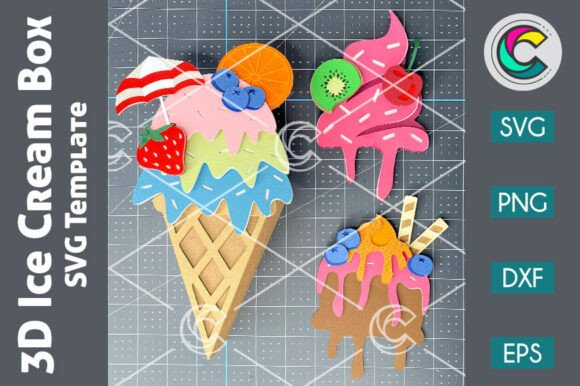
3D Ice Cream SVG Candy Holder
Introducing the 3D Ice Cream SVG Candy Holder, a digital treasure trove guaranteed to sweeten your creative endeavors. This isn't just another clipart image; it is a comprehensive design asset built for precision and versatility. Whether you are a seasoned small business owner producing custom party favors or a hobbyist looking to add a personal touch to your child’s birthday shindig, this digital download offers an array of options to tailor your projects for a perfect fit. Unleash your creativity with layered templates primed for crafting enchanting ice cream treat boxes that stand out in any setting.
No matter your tool of choice—be it traditional scissors and glue or state-of-the-art cutting machines like Cricut or Silhouette—this package ensures a seamless crafting journey. Inject a touch of whimsy into festive gatherings, summer festivals, or any extraordinary moment with these delightful candy holders. However, before you dive straight into cutting, there are critical details regarding file formats, software compatibility, and assembly that can make the difference between a professional-looking result and a frustrating experience. Let’s explore how to get the most out of this versatile pack and let your celebrations bask in an extra drizzle of imagination.
Understanding the Format Advantage
One of the primary reasons creators gravitate toward vector-based designs is scalability without quality loss. The 3D Ice Cream SVG Candy Holder comes packed with multiple file types: SVG, DXF, EPS, PNG, and Outline PNG. While having choices is excellent, it can also lead to confusion if you do not understand what each format actually does for your specific workflow.
SVG (Scalable Vector Graphics) files are the gold standard for modern cutting machines. They contain mathematical paths that allow the machine to cut intricate curves and lines precisely. If you own a Cricut Design Space account or use Silhouette Studio Designer Edition, this is your go-to format. It allows you to resize the ice cream holder from a tiny favor box to a large display piece without pixelation or jagged edges.
In contrast, PNG (Portable Network Graphics) files are raster images made of pixels. While they are useful for printing on paper or using as visual references, they cannot be cut by electronic plotters in the same way vectors can. A common mistake beginners make is attempting to send a low-resolution PNG directly to a cutting mat expecting clean cuts. Always ensure you are using the vector files for cutting operations.
Navigating Software Compatibility
A frequent stumbling block for new users is software mismatch. The product description notes that SVG cut files work with Cricut Design Space, Silhouette Designer Edition, Brother ScanNCut, and others. However, it explicitly states that DXF files are intended for Silhouette Basic Edition. This distinction is vital because Basic Edition has limited capabilities compared to the Designer version.
If you purchase the 3D Ice Cream SVG Candy Holder but only have Silhouette Basic Edition, trying to open complex SVG layers might result in errors or flattened graphics that lose their structural integrity. In such cases, the included DXF file becomes your best friend, as it is widely compatible with older or more basic software versions. Always check your software version before downloading. If you are unsure, the EPS file serves as a robust alternative for those using desktop publishing tools.
For users working with Adobe Illustrator, CorelDraw, or other vector graphics editors, the EPS (Encapsulated PostScript) file is ideal. EPS files preserve vector data and are excellent for editing text, changing colors, or combining the ice cream design with other graphic elements. This is particularly useful for entrepreneurs who want to brand their packaging further by adding logos or custom messages around the ice cream motif.
The Importance of Layer Management
What makes this specific design "3D" is its layered construction. Unlike a flat sticker, the 3D Ice Cream SVG Candy Holder relies on distinct parts folding and assembling to create depth. When you unzip the files, you will notice multiple layers. A common error is ignoring the layer hierarchy and cutting all pieces at once without planning the assembly order.
To avoid misalignment, take time to sort your layers in your design software before sending them to the cutter. Identify which parts form the base, which form the scoops, and which serve as decorative toppings. Using different colored cardstock for different layers can help during the physical assembly process, ensuring you don’t glue the front panel to the wrong side. Precision here directly impacts the final aesthetic; a slightly off-center fold can ruin the illusion of three-dimensionality.
Preparing Your Materials
Even the best digital files depend on the physical materials you choose. For a sturdy candy holder that can hold treats without collapsing, lightweight printer paper is insufficient. Instead, opt for cardstock ranging from 65lb to 80lb weight. Thicker cardstock may require scoring rather than just creasing to prevent cracking along the fold lines.
Another overlooked detail is the adhesive. Standard white school glue can warp thin cardstock as it dries. Consider using double-sided tape dots or a fine-tip glue pen for cleaner, faster assembly. This attention to material quality elevates the perceived value of your handmade items, whether you are selling them at local markets or giving them as gifts.
Checking Before You Create
Before embarking on your first project, perform a quick sanity check on your digital assets. Ensure you have unzipped the downloaded ZIP file completely. Sometimes, files remain compressed within folders, leading to confusion when you try to open them. Verify that your cutting machine’s blade is sharp enough for the thickness of your chosen cardstock; a dull blade will tear the delicate outlines of the ice cream design.
Additionally, review the dimensions in your software. Digital files often default to inches or centimeters based on your regional settings. Make sure the scale matches your desired output size. If you plan to mass-produce these holders, consider creating a test run with scrap paper first. This step saves expensive cardstock and helps you refine your folding technique.
Conclusion
The 3D Ice Cream SVG Candy Holder is more than just a cute graphic; it is a functional template that rewards careful preparation and technical awareness. By understanding the differences between SVG, DXF, and EPS formats, matching them to the correct software, and respecting the layered nature of the design, you ensure a smooth crafting experience. Avoid the pitfalls of incompatible software and poor material choices by following these practical guidelines. With the right approach, this digital download becomes a powerful tool for creating memorable, high-quality party favors that delight guests and enhance your creative portfolio.