Mama and Baby Bear 3D Shadow Box
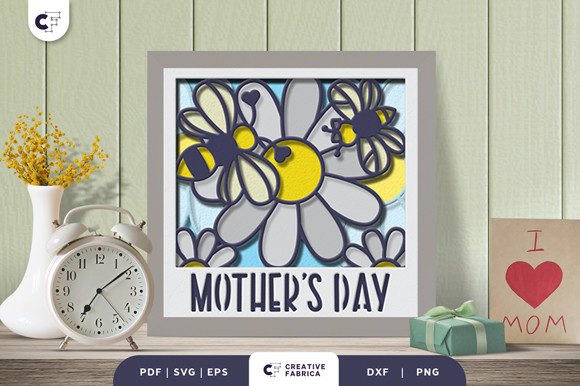
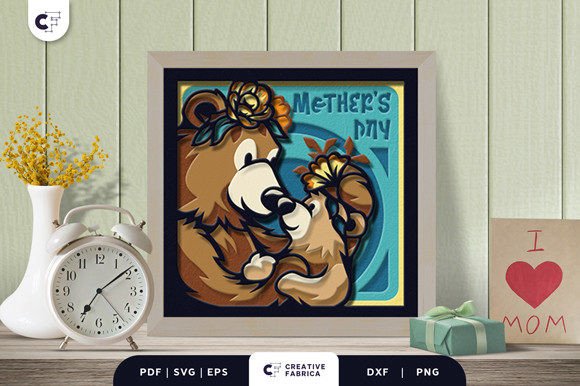
Crafting a meaningful gift often requires balancing aesthetic appeal with technical feasibility. For creators, small business owners, and hobbyists who utilize digital cutting machines, the challenge lies in finding designs that are visually intricate yet structurally sound for production. The Mama and Baby Bear 3D Shadow Box addresses this specific intersection of art and engineering. It is an animal-themed paper cut template designed specifically for Mother’s Day, featuring a mama bear and a baby bear adorned with flower crowns to symbolize their close relationship.
This asset is not merely a static image; it is a multi-layered construction file intended to create depth and dimension. By understanding how this SVG fits into your broader creative workflow, you can streamline your production process, ensure consistent quality control, and deliver high-value products or personal gifts efficiently. This article explores the practical implementation of this design, from file preparation to final assembly, ensuring smooth integration into your existing projects.
Understanding the Asset Structure
Before initiating any cutting project, it is crucial to analyze the source files. The Mama and Baby Bear 3D Shadow Box comes in multiple formats: SVG, PDF, EPS, PNG, and DXF. Each format serves a distinct purpose within a professional or hobbyist workflow.
- SVG (Scalable Vector Graphics): This is the primary format for most modern cutting software such as Cricut Design Space, Silhouette Studio, or Adobe Illustrator. It allows for infinite scalability without loss of resolution, which is essential when adjusting the size of your shadow box layers.
- DXF: Ideal for users working with older software versions or specific industrial cutting plotters that rely on CAD-based workflows.
- PDF and EPS: These vector formats are useful for printing physical templates or for importing into graphic design suites like InDesign for layout purposes.
- PNG: A raster image included for quick previewing or for use in non-vector-based editing tools.
The design consists of 9 distinct layers. This layer count is significant because it dictates the complexity of the assembly process. Nine layers provide enough depth to create a true 3D effect without becoming overly fragile or difficult to align. Understanding this structure allows you to plan your material usage and cutting time accurately.
Material Selection and Compatibility
The visual impact of a 3D shadow box relies heavily on the substrate used. The recommended material for this project is Encore Cardstock 80 lb cover (216 gsm). This specification is critical for several reasons related to usability and durability.
First, 216 gsm cardstock provides sufficient stiffness to hold its shape once layered. Thinner papers may collapse under the weight of upper layers or fail to stand upright in a frame. Conversely, cardstock that is too thick may be difficult for consumer-grade cutting machines to slice cleanly, leading to jagged edges or motor strain. The 80 lb cover weight strikes a balance between rigidity and cuttability.
Second, the color consistency of Encore Cardstock ensures that the contrast between the bears and the background elements remains sharp. When designing for Mother’s Day, the soft tones of the flower crowns and the fur texture of the bears need to pop against the shadow box background. Using a uniform brand of cardstock reduces variability in opacity and texture, which is vital for maintaining a professional finish across multiple units if you are producing these for sale.
If you do not have access to the specific Encore brand, look for alternative cardstocks with similar GSM ratings. Ensure that the paper has a smooth finish to prevent snagging during the weeding process, where excess paper is removed from the cut lines.
Workflow Integration and Preparation
Integrating the Mama and Baby Bear 3D Shadow Box into your workflow begins with digital preparation. Even though the design is described as "incredibly easy to cut," proper setup prevents errors later in the process.
File Organization
Upon downloading the zip file containing the SVG, PDF, EPS, PNG, and DXF formats, organize these assets into a dedicated project folder. Name the layers logically if the software does not already do so. Since there are nine layers, keeping them ordered from back to front is essential for correct assembly. Most cutting software will import the layers automatically, but verifying the stack order before sending to the machine saves time.
Software Settings
When loading the SVG into your cutting software, check the scale. The specified size is 20.32×20.32 cm (approximately 8×8 inches). If you intend to change the dimensions, ensure that all layers are scaled proportionally. Resizing individual layers independently can misalign the 3D effect, causing the bears to appear disjointed rather than cohesive.
Set your blade depth and pressure according to your machine’s manual for 216 gsm cardstock. A common mistake is using settings optimized for standard printer paper, which results in incomplete cuts. Perform a test cut on a scrap piece of the same cardstock to verify that the blade penetrates fully without damaging the backing mat.
Execution and Assembly Strategy
The actual cutting phase should be approached methodically. While the font used for the "Mother’s Day" text is unique, it is engineered to be cutting-friendly. This means the curves and serifs are simplified to reduce the risk of tearing during weeding. However, intricate details still require patience.
Weeding Process
Weed each layer immediately after cutting while the paper is still flat on the mat. Use a sharp weeding tool to lift the negative space. For the flower crowns, pay attention to the small petals; removing these fragments carefully preserves the integrity of the crown shape. If you are producing multiple units, consider creating a jig or alignment guide to speed up this repetitive task.
Layering and Adhesion
The core of the 3D effect lies in the spacing between layers. You will need adhesive foam tape or double-sided spacers for each layer except the very last one. The choice of spacer height determines the depth of the shadow box. Standard 3mm foam pads are usually sufficient, but experimenting with varying heights can add dynamic perspective.
Align the layers precisely. Most SVG files include registration marks or center points to assist with alignment. Place the first layer (usually the background) on your base board. Apply adhesive to the back of the second layer, align it, and press firmly. Repeat this process for all nine layers. Consistency in alignment is key; if one layer is off-center, the cumulative error will distort the final image of the mama and baby bears.
Quality Control and Final Presentation
Once assembled, inspect the shadow box for any loose adhesives or misaligned edges. Gently shake the frame to ensure no parts detach. The structural integrity of the 9-layer design depends on strong bonding at every interface.
For those selling these items, packaging is part of the workflow. Use rigid mailers or specialized craft boxes to protect the protruding layers from being crushed during shipping. Include a care instruction card noting that the item should be kept away from moisture and direct sunlight to preserve the vibrancy of the cardstock.
Strategic Use Cases
The Mama and Baby Bear 3D Shadow Box is versatile beyond simple decoration. Here is how it fits into various professional and personal contexts:
- Small Business Inventory: Create a limited-edition Mother’s Day collection. The ease of cutting allows for rapid prototyping and bulk production. Pair the shadow box with matching tags or greeting cards using the same SVG elements to create a bundled product offering.
- Personalized Gifting: Customize the color palette to match a recipient’s home decor. The neutral tones of the bears allow for flexibility in accent colors, making it a thoughtful, tailored gift.
- Educational Projects: Use this design in workshops to teach students about vector graphics, layering techniques, and spatial awareness. The clear distinction between the 9 layers makes it an excellent case study for digital fabrication classes.
- Home Decor Refresh: For individuals looking to update their living spaces, this shadow box adds a touch of warmth and thematic relevance to entryways or mantels during the spring season.
Long-Term Value and Maintenance
Investing in high-quality SVG assets like this one offers long-term value. Unlike printed materials that degrade, digital files can be reused indefinitely. You can store the Mama and Baby Bear 3D Shadow Box files in a cloud repository, tagging them by occasion (Mother’s Day), theme (Animals), and type (3D Shadow Box). This organization simplifies future searches, allowing you to quickly retrieve assets for upcoming holidays or customer requests.
Furthermore, mastering the assembly of this 9-layer design builds muscle memory and technical skill. Once you are comfortable with the alignment and adhesion techniques required here, you can apply the same principles to more complex 3D structures, expanding your capabilities as a creator.
In conclusion, the Mama and Baby Bear 3D Shadow Box is more than just a cute design; it is a well-engineered tool for efficient production. By selecting the right cardstock, organizing your digital files, and adhering to a precise assembly workflow, you can produce beautiful, durable results that resonate with recipients. Whether for commercial sale or personal expression, this asset streamlines the path from concept to finished product, ensuring a seamless experience for anyone involved in the creation process.